AI Assistants (MCP)
Connect an AI Assistant
Strackr is an MCP server: connect Claude, ChatGPT or another AI assistant to your account and ask about your affiliate data in plain language, without opening the dashboard or building against the API. For what you can ask, with examples, see the AI assistants page. This page covers how to connect.
The Connector URL
There is one connector URL for your whole account, and everyone on your team uses the same one:
https://mcp.strackr.com/mcpEach person connects under their own Strackr login. Nobody needs to share a credential.
Claude.ai and ChatGPT
In Claude, Strackr is in the connector directory: open the listing and click Connect, or search Strackr under Customize → Connectors. There is nothing to paste. Claude labels it Community, as it does every connector built by a third party. If you already added Strackr by URL, keep it: that connection keeps working and there is no need to add it again.
In ChatGPT and any other client, open Settings → Connectors, add a custom connector and paste the URL above.
Your browser then opens Strackr and asks you to approve the connection. You sign in with your own login, including two-factor authentication if you have it enabled. The screen names the assistant that is asking and what it will be able to read.
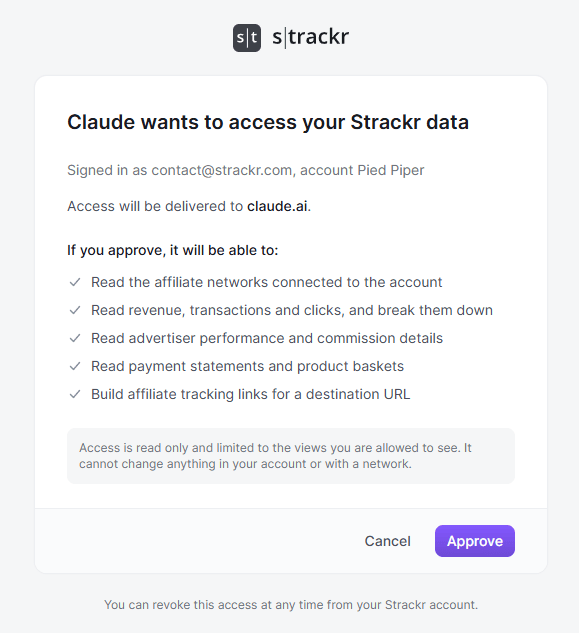
That is the whole setup: there is no key to copy and nothing to configure.
Claude Code and Codex CLI
Clients that cannot open a browser, such as Claude Code and Codex CLI, sign in with a token instead. A token is created from Settings → Integrations, which requires the Admin or Super Admin role, and it belongs to the person who creates it: it reads data at their permission level and cannot be handed to another user.
If you are an administrator, the guide on that page has the commands for each client. Other roles use the browser sign-in above.
Other Clients
Any client that supports remote MCP servers works with the connector URL and the browser sign-in. Administrators can also use their own token as a bearer header.
What Your Assistant Can Do
Every connection is read-only. An assistant can query your affiliate data, but it can never change anything in Strackr or with your affiliate networks. That holds when an assistant runs a question on a schedule, such as a ChatGPT scheduled task: the schedule lives in the assistant, and each run is simply another read of your data.
What a connection reaches is your affiliate data, in five groups:
- What your account is made of: network connections, Views, tracking channels and advertisers.
- Statistics over time: with breakdowns by network, category, View, device, country and custom tracking value.
- Advertiser performance: a paginated report that stays usable on accounts holding tens of thousands of advertisers.
- Reports: transactions, clicks, revenues, payment statements and products sold.
- Tools and forecasting: revenue forecasts, advertiser commission rates, coupons and the affiliate link builder.
Your assistant sees exactly what you see in the dashboard, nothing more. Connecting never widens your access.
The answers pass through the company that runs your assistant, so review its privacy settings, such as whether your conversations are used to train its models.
To disconnect an assistant, ask an administrator: they can see every connection in the account and revoke any of them, which takes effect on the assistant's next request.
Availability
The AI connector is part of the Affiliate API module, which an administrator can add from Settings → Subscription. Once it is active, every role except Read-only and Tools only can connect an assistant under their own login.